I won’t be maintaining this blog at this location anymore.
The new location is http://www.bluebill.net.

I won’t be maintaining this blog at this location anymore.
The new location is http://www.bluebill.net.
I watch a lot of Coursera videos and usually view them at 1.25x or 1.5x normal viewing speed. I started thinking about how much that would translate into viewing time.
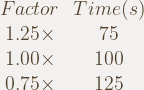
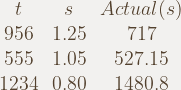
From the table, my assumptions can be seen. Viewing a video at 1x speed should show the video in real-time. If the video is 100 seconds long, I would expect it to take 100 seconds at a speed up factor of 1x. If however I choose to view the video at 1.25x speed up factor I would expect the video to be shorter, around 75 seconds. If the speed up factor were set to 0.75x, I would expect the video to take longer to watch, in the neighbourhood of 125 seconds.
If t is the time in seconds of the video at normal speed. We can formulate the time when a speed up factor is applied. Set t = 100, to simplify calculations and assumptions.

This isn’t what we wanted.
This isn’t what we wanted either!
If we think of the speed up factor in terms of percentages we could try something like this:
We are getting closer, this tells us how much time will be gained/lost by using this speed up factor.
This is what we are looking for. Lets replace 100 with t and 0.75 with s and doing some algebra:
We arrive at the following formula which nicely expresses the relationship between the speed up factor and t:
Here are the assumptions that we are making:
If s where to equal 0 it would indicate that the video was paused and therefore t should become infinite. This formula doesn’t work that way. Negative values for s would indicate rewinding and that t should be going backwards.
I had to determine an arrangement of teams from a player pool. Specifically there were 9 players that needed to be organized into fair teams. It seemed straight forward to arrange them into 3 teams of 3 players. The other caveat was that the teams needed to be as fair as possible. Some players were highly skilled while others were not. It wouldn’t be fair to stack the best players on a single team. In order to determine a fair team I had to figure out how many combinations of teams were possible. This would allow me to iterate through all of the combinations and apply a metric to each combination. The combination that produced the minimal value would be the optimal arrangement.
Here is what the player pool looks like:
The first step was to determine the combinations. Information on the combination formulae can be found here: http://en.wikipedia.org/wiki/Combination. It is straight forward to apply it to simple sequences. For example, to determine the number of combinations of one team of 3 players out of a pool of nine players is as follows. Basically, since there are only 3 slots on a team and we cannot have duplicate players, that is, once a player is selected, the pool of available players shrinks. The following calculation illustrates the number of combinations a 3 person team can have from a pool of 9 players:
Since the number of combinations that the first team can have is 84, how many combinations are there for the second team. That can be calculated as follows:
The number of combinations for the second team is 20. To calculate, the combinations for the second team, we have to realize that there are only 6 players left in the pool to choose from. Hence only 20 ways to make the second team. After the first team and second team are constructed, there are only 3 players left in the pool. Our third team is decided for us, how convenient! There is only one way to express the third team.
These calculations do not indicate how many ways there are to construct the 3 teams, they only gives us an idea of the ways to construct the individual teams. In order to determine the number of combinations of teams we need to multiply the individual combinations together.
The results look a little high and that is because what we calculated was the permutations of the teams and not the combinations. To fix that we divide the permutations by the number of ways that the teams can be arranged (the reason we don’t want permutations is because team 1, team 2, team 3 is the same as team 2, team 1, team 3). To fix this, divide the team permutations by the number of ways to arrange the teams, 3!
Now that we know how many combinations, we can write a program to generate the combinations and be able to evaluate them.
players_per_team = 3
player_pool = {'p1', 'p2', 'p3', 'p4', 'p5', 'p6', 'p7', 'p8', 'p9' }

unique_teams = set()

for team1 in generate_valid_team_combinations(players_per_team, player_pool):
    t1 = frozenset(team1)
    reduced_pool = player_pool.difference(t1)

    for team2 in generate_valid_team_combinations(players_per_team, reduced_pool):
        t2 = frozenset(team2)
        reduced_pool2 = reduced_pool.difference(t2)
        t3 = frozenset(reduced_pool2)
        unique_teams.add(frozenset({t1, t2, t3}))

    return unique_teams
The code above is designed for the 3 team case. It would need to be modified to deal with other amounts of teams.
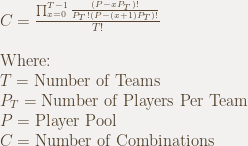
In working this problem out I have developed the formula to calculate the combinations for any number of teams and any player pool size:
This is the general equation in latex for the number of combinations:
I needed to be able to generate a sequence of letters from a specific index value. Basically, I wanted to loop through a sequence of values and retrieve the corresponding string value. For example, 0 would be A; 4 would be E; 36 would be AK; etc.
0 = A
1 = B
2 = C
3 = D
4 = E
5 = F
21 = V
22 = W
23 = X
24 = Y
25 = Z
26 = AA
27 = AB
28 = AC
36 = AK
37 = AL
38 = AM
39 = AN
I have created a small python script as a proof of concept that does the calculation using two different methods. Method 1, uses a recursive function to build up the correct sequence from the index value. Essentially the code is treating the index integer as a value that has the index into a large 2D are encoded within it. We use the modulus method to extract the index for the particular row. We then subtract the difference from the index to see if there are any more letters stored in the encoded index. Method 1 returns the value of the sequence in the correct order.
Method 1:
def get_name(index):
    """
    Translate the index to a set of letters in sequential order.
    """

    #termination criteria
    if index < 0:
        return ''

    #Take the modulus of the current index and translate it into one of the
    #characters stored in the letters string.
    selected_index = index % lettersCount

    return letters[selected_index] + get_name(math.floor((index - lettersCount)/lettersCount))
Method 2 works in a similar manor, yet simpler, to Method 1. However it calculates the sequence in reverse order. So in order for the result to be useful, the sequence must be reversed.
Method 2:
def get_name2(index, values = []):
    """
    Translate the index to a set of letters in sequential order, but reversed.
    """

    if not values:
        values = []

    #termination criteria
    if index < 0:
        return values

    #Take the modulus of the current index and translate it into one of the
    #characters stored in the letters string.
    selected_index = index % lettersCount
    values.append(letters[selected_index])

    return get_name2(math.floor((index - lettersCount)/lettersCount), values)
Here is a script to demonstrate the methods:
#!/usr/bin/env python3
#-*- coding:utf-8 -*-

"""

    index = 0, value = A
    index = 1, value = B
    index = 2, value = C
    index = 3, value = D
    index = 4, value = E
    index = 5, value = F
    index = 6, value = G
    index = 7, value = H
    index = 8, value = I
    index = 9, value = J
    index = 10, value = K
    index = 11, value = L
    index = 12, value = M
    index = 13, value = N
    index = 14, value = O
    index = 15, value = P
    index = 16, value = Q
    index = 17, value = R
    index = 18, value = S
    index = 19, value = T
    index = 20, value = U
    index = 21, value = V
    index = 22, value = W
    index = 23, value = X
    index = 24, value = Y
    index = 25, value = Z
    index = 26, value = AA
    index = 27, value = AB
    index = 28, value = AC
    index = 29, value = AD
    index = 30, value = AE
    index = 31, value = AF
    index = 32, value = AG
    index = 33, value = AH
    index = 34, value = AI
    index = 35, value = AJ
    index = 36, value = AK
    index = 37, value = AL
    index = 38, value = AM
    index = 39, value = AN
"""

import math
import sys

letters = 'ABCDEFGHIJKLMNOPQRSTUVWXYZ'
# letters = 'ABCDEF'
lettersCount = len(letters)

def get_name(index):
    """
    Translate the index to a set of letters in sequential order.
    """

    #termination criteria
    if index < 0:
        return ''

    #Take the modulus of the current index and translate it into one of the
    #characters stored in the letters string.
    selected_index = index % lettersCount

    return letters[selected_index] + get_name(math.floor((index - lettersCount)/lettersCount))

def test1():
    print(letters)
    print('index = 8: ', get_name(8)[::-1])
    print('index = 15: ',get_name(15)[::-1])
    print('index = 17: ',get_name(17)[::-1])
    print('index = 18: ',get_name(18)[::-1])
    print('index = 75: ',get_name(75)[::-1])
    print('index = 1000: ',get_name(1000)[::-1])
    print()

    for i in range(100):
        print('index = {}, value = {}'.format(i, get_name(i)[::-1]))

def get_name2(index, values = []):
    """
    Translate the index to a set of letters in sequential order, but reversed.
    """

    if not values:
        values = []

    #termination criteria
    if index < 0:
        return values

    #Take the modulus of the current index and translate it into one of the
    #characters stored in the letters string.
    selected_index = index % lettersCount
    values.append(letters[selected_index])

    return get_name2(math.floor((index - lettersCount)/lettersCount), values)

def test2():
    print(letters)

    for i in range(1000):
        print('index = {}, value = {}'.format(i,
                                              ''.join(reversed(get_name2(i)))))

def main():
    """
    This runs the rest of the functions in this module
    """

    print('test1')
    test1()

    print('test2')
    test2()

    return 0 # success

if __name__ == '__main__':
    status = main()
    sys.exit(status)
Introduction
My son plays 5 pin bowling and is a member of YBC Canada. I used to keep track of his averages and some statistics using a spreadsheet. I would enter the data after the end of every series of games and then copy the cells down so that the formula were applied and the correct statistics were calculated. This process worked well enough except I started to notice small discrepancies between my calculations and the posted results.
Why Spreadsheets Suck
I investigated my calculations and it turns out that the average calculation didn’t have a proper anchor cell set. That means that when the cells were copied down, the block of cells used to calculate the averages would shift down as well. It took awhile to detect the error as the averages were only out by a very small amount at first. As time went on, the differences were obvious.

This shows how the cells should be properly anchored so that when the formula are copied to new cells the overall average is calculated correctly.
I have had this happen in numerous situations over the years. It clearly illustrates the dangers of using a spreadsheet without properly fixing your calculations. You will get unexpected sometimes subtle results. I am not the only one that has noticed these potential pitfalls the European Spreadsheet Risks Interest Group has a number of stories that spreadsheet miscalculations have caused some serious problems. Here is another “Worst Spreadsheet Blunders” with some more examples.
In a quest to improve things for myself I wrote up a small python script that did the calculations.This script was pretty simple and it mirrored the way that I had done the calculations in the spreadsheet. It worked, but was not worth sharing or writing about. I re-wrote the script entirely from the ground up. I used python 3 and test driven development methods.
TDD – Test Driven Development
There is a lot of information out there about Test Driven Development. Basically it is a different way of looking at the development process. Essentially the developer writes so-called unit tests to test specific code functionality. The real twist is that tests are written first and the code that makes them pass is written after the first initial failing test. This means that you initially write a test that fails. The other basic idea is that you write only the minimal amount of code to make the test pass – nothing more. I followed some of the basics in this tutorial. I really liked the TDD approach to software design. It allowed me to think about the object model in terms of code that would actually be using the API that I was creating. It also allowed me to think about how the parts of the system would interact. I found my self creating large classes and monolithic solutions. At which point I would stop and think, ‘Can I make this simpler?’. In most cases, the code could be simplified. Originally I had classes that would parse the bowl file stream. These were demoted down to simple functions.
During the course of a TDD cycle, I realized that I would have some trouble testing code around parsing the bowl file. I had a flash of insight and realized that I could test the parsing could by passing it a memory stream to simulate a file stream. This worked remarkable well! In the end I will probably develop more software using the TDD approach. In the end when I was done, it was a simple matter of ‘wiring’ the units together to form a functional program.
What the Program Does
The program processes bowling data and generates statistics that are geared towards 5-pin bowling. It generates the following statistics:
┌────────────┬────────────────────────┬────────────┬─────────┬────────────────┬──────────────┬───────────────────┬─────────────────┐
│    Date    │        Matches         │ Total Pins │ Average │ Season Average │ % Difference │ Pins Over Average │ Total Pins Over │
├────────────┼────────────────────────┼────────────┼─────────┼────────────────┼──────────────┼───────────────────┼─────────────────┤
│ 2012-09-15 │    121,    101,     94 │    316     │ 105.33  │     105.33     │    +0.00     │    16,   0,   0   │       16        │
├────────────┼────────────────────────┼────────────┼─────────┼────────────────┼──────────────┼───────────────────┼─────────────────┤
│ 2012-09-22 │    108,    119,    103 │    330     │ 110.00  │     107.67     │    +2.12     │     0,  11,   0   │       11        │
├────────────┼────────────────────────┼────────────┼─────────┼────────────────┼──────────────┼───────────────────┼─────────────────┤
│ 2012-09-29 │    125,     77,    148 │    350     │ 116.67  │     110.67     │    +5.14     │    14,   0,  37   │       51        │
├────────────┼────────────────────────┼────────────┼─────────┼────────────────┼──────────────┼───────────────────┼─────────────────┤
│ 2012-10-06 │     92,    106,    121 │    319     │ 106.33  │     109.58     │    -3.06     │     0,   0,  11   │       11        │
├────────────┼────────────────────────┼────────────┼─────────┼────────────────┼──────────────┼───────────────────┼─────────────────┤
│ 2012-10-12 │     98,    123,     93 │    314     │ 104.67  │     108.60     │    -3.76     │     0,  14,   0   │       14        │
├────────────┼────────────────────────┼────────────┼─────────┼────────────────┼──────────────┼───────────────────┼─────────────────┤
│ 2012-10-20 │     95,     84,    108 │    287     │  95.67  │     106.44     │    -11.27    │     0,   0,   2   │        2        │
├────────────┼────────────────────────┼────────────┼─────────┼────────────────┼──────────────┼───────────────────┼─────────────────┤
│ 2012-10-27 │    142,    101,    109 │    352     │ 117.33  │     108.00     │    +7.95     │    34,   0,   1   │       35        │
├────────────┼────────────────────────┼────────────┼─────────┼────────────────┼──────────────┼───────────────────┼─────────────────┤
│ 2012-11-03 │    110,     97,    110 │    317     │ 105.67  │     107.71     │    -1.93     │     2,   0,   2   │        4        │
├────────────┼────────────────────────┼────────────┼─────────┼────────────────┼──────────────┼───────────────────┼─────────────────┤
│ 2012-11-10 │    106,    108,     90 │    304     │ 101.33  │     107.00     │    -5.59     │     0,   1,   0   │        1        │
├────────────┼────────────────────────┼────────────┼─────────┼────────────────┼──────────────┼───────────────────┼─────────────────┤
│ 2012-11-17 │    123,    126,     98 │    347     │ 115.67  │     107.87     │    +6.74     │    15,  18,   0   │       33        │
├────────────┼────────────────────────┼────────────┼─────────┼────────────────┼──────────────┼───────────────────┼─────────────────┤
│ 2012-11-23 │     97,     94,    106 │    297     │  99.00  │     107.06     │    -8.14     │     0,   0,   0   │        0        │
├────────────┼────────────────────────┼────────────┼─────────┼────────────────┼──────────────┼───────────────────┼─────────────────┤
│ 2012-12-01 │    138,    131,    114 │    383     │ 127.67  │     108.78     │    +14.80    │    29,  22,   5   │       56        │
├────────────┼────────────────────────┼────────────┼─────────┼────────────────┼──────────────┼───────────────────┼─────────────────┤
│ 2012-12-08 │    133,    120,    102 │    355     │ 118.33  │     109.51     │    +7.45     │    23,  10,   0   │       33        │
├────────────┼────────────────────────┼────────────┼─────────┼────────────────┼──────────────┼───────────────────┼─────────────────┤
│ 2012-12-15 │    184,    131,    121 │    436     │ 145.33  │     112.07     │    +22.89    │    72,  19,   9   │       100       │
├────────────┼────────────────────────┼────────────┼─────────┼────────────────┼──────────────┼───────────────────┼─────────────────┤
│ 2012-12-22 │    172,    104,    139 │    415     │ 138.33  │     113.82     │    +17.72    │    58,   0,  25   │       83        │
├────────────┼────────────────────────┼────────────┼─────────┼────────────────┼──────────────┼───────────────────┼─────────────────┤
│ 2013-01-05 │    132,    176,    118 │    426     │ 142.00  │     115.58     │    +18.60    │    16,  60,   2   │       78        │
├────────────┼────────────────────────┼────────────┼─────────┼────────────────┼──────────────┼───────────────────┼─────────────────┤
│ 2013-01-10 │    138,     92,    130 │    360     │ 120.00  │     115.84     │    +3.46     │    22,   0,  14   │       36        │
├────────────┼────────────────────────┼────────────┼─────────┼────────────────┼──────────────┼───────────────────┼─────────────────┤
│ 2013-01-19 │     98,    142,    161 │    401     │ 133.67  │     116.83     │    +12.59    │     0,  25,  44   │       69        │
├────────────┼────────────────────────┼────────────┼─────────┼────────────────┼──────────────┼───────────────────┼─────────────────┤
│ 2013-01-26 │     97,    136,    129 │    362     │ 120.67  │     117.04     │    +3.01     │     0,  19,  12   │       31        │
├────────────┼────────────────────────┼────────────┼─────────┼────────────────┼──────────────┼───────────────────┼─────────────────┤
│ 2013-02-02 │     97,    108,    119 │    324     │ 108.00  │     116.58     │    -7.95     │     0,   0,   2   │        2        │
├────────────┼────────────────────────┼────────────┼─────────┼────────────────┼──────────────┼───────────────────┼─────────────────┤
│ 2013-02-09 │    109,     90,    108 │    307     │ 102.33  │     115.90     │    -13.26    │     0,   0,   0   │        0        │
├────────────┼────────────────────────┼────────────┼─────────┼────────────────┼──────────────┼───────────────────┼─────────────────┤
│ 2013-02-16 │    108,    117,    117 │    342     │ 114.00  │     115.82     │    -1.59     │     0,   1,   1   │        2        │
├────────────┼────────────────────────┼────────────┼─────────┼────────────────┼──────────────┼───────────────────┼─────────────────┤
│ 2013-02-23 │    108,    115,     96 │    319     │ 106.33  │     115.41     │    -8.53     │     0,   0,   0   │        0        │
├────────────┼────────────────────────┼────────────┼─────────┼────────────────┼──────────────┼───────────────────┼─────────────────┤
│ 2013-03-02 │    137,    112,    121 │    370     │ 123.33  │     115.74     │    +6.16     │    21,   0,   5   │       26        │
├────────────┼────────────────────────┼────────────┼─────────┼────────────────┼──────────────┼───────────────────┼─────────────────┤
│ 2013-03-09 │    124,     86,     87 │    297     │  99.00  │     115.07     │    -16.23    │     9,   0,   0   │        9        │
├────────────┼────────────────────────┼────────────┼─────────┼────────────────┼──────────────┼───────────────────┼─────────────────┤
│ 2013-03-15 │    138,    121,    185 │    444     │ 148.00  │     116.33     │    +21.40    │    22,   5,  69   │       96        │
├────────────┼────────────────────────┼────────────┼─────────┼────────────────┼──────────────┼───────────────────┼─────────────────┤
│ 2013-03-23 │    117,    101,    158 │    376     │ 125.33  │     116.67     │    +6.91     │     0,   0,  41   │       41        │
├────────────┼────────────────────────┼────────────┼─────────┼────────────────┼──────────────┼───────────────────┼─────────────────┤
│            │ 120.26, 111.78, 117.96 │    9450    │         │                │              │                   │       840       │
└────────────┴────────────────────────┴────────────┴─────────┴────────────────┴──────────────┴───────────────────┴─────────────────┘
In addition, badge a table of badge levels can be calculated. The following levels are calculated:
┌─────────────────────────────────┬───────────────────┬──────────────┬──────────────┐
│            High/Low             │ Pins Over Average │   Singles    │   Triples    │
├─────────────────────────────────┼───────────────────┼──────────────┼──────────────┤
│ High Singles = 185 (2013-03-15) │   2012-09 = 78    │  75-99 = 20  │ 350-399 = 8  │
├─────────────────────────────────┼───────────────────┼──────────────┼──────────────┤
│  Low Singles = 77 (2012-09-29)  │   2012-10 = 62    │ 100-124 = 37 │ 400-449 = 4  │
├─────────────────────────────────┼───────────────────┼──────────────┼──────────────┤
│ High Triples = 444 (2013-03-15) │   2012-11 = 38    │ 125-149 = 16 │ 450-499 = 0  │
├─────────────────────────────────┼───────────────────┼──────────────┼──────────────┤
│ Low Triples = 287 (2012-10-20)  │   2012-12 = 172   │ 150-174 = 3  │ 500-549 = 0  │
├─────────────────────────────────┼───────────────────┼──────────────┼──────────────┤
│                                 │   2013-01 = 214   │ 175-199 = 2  │ 550-599 = 0  │
├─────────────────────────────────┼───────────────────┼──────────────┼──────────────┤
│                                 │    2013-02 = 4    │ 200-224 = 0  │ 600-649 = 0  │
├─────────────────────────────────┼───────────────────┼──────────────┼──────────────┤
│                                 │   2013-03 = 172   │ 225-249 = 0  │ 650-699 = 0  │
├─────────────────────────────────┼───────────────────┼──────────────┼──────────────┤
│                                 │                   │ 250-450 = 0  │ 700-1350 = 0 │
└─────────────────────────────────┴───────────────────┴──────────────┴──────────────┘
In addition, the bowling data can be ‘tagged’. This means that you can store non-league data in the same file and generate statistics from it without affecting the league statistics. With the proper option set when the program is launched, all of the tables will be displayed. There is also an ability to write the tables to a text file. The program can be run on multiple bowl files and generate the statistics individually.
How to use it
The program is easy to use. Issue the following command at a command prompt:
$ python3 bowling_stats.py ~/bowling_data/*.bowl
All of the bowl files located in ~/bowling_data will be processed and the statistics will be displayed in the terminal. There are a number of command line switches that the program accepts as well.
Here is a listing of the available switches:
$ python3 bowling_stats.py -h
usage: bowling_stats.py [-h] [-d] [-f] [-b] path

positional arguments:
  path           The name and path of the *.bowl file to process. Unix
                 wildcards can be used. (default = *.bowl)

optional arguments:
  -h, --help     show this help message and exit
  -d, --details  Display tables for all tagged data.
  -f, --file     Write the statistics to an output file.
  -b, --badges   Generate the badge level tables.
Data Format
The bowl file is used to capture bowling data from an individual bowler. It consists of header data and the actual match data. It consists of lines of data interspaced with comments. Comments are lines that the program will ignore when processing the file. A comment is a line that starts with the hash (#) character. These lines will be ignored. Comments can be in-line with text. Anything after the comment character will be ignored.
The header consists of the bowlers: name, division, lane, season and id. The division can be anything, but is typically, bantam, junior or senior. The lane is the name of the home bowling alley. Season is the year in which the data was/is collected and the id is a numeric identifer for the player. The header also needs to end with a ‘#-‘ character combination or an empty line.
The bowling data consists of 3 parts: A date, a number of game scores, and a list of ‘tags’. The date is expressed in the iso standard format: yyyy-mm-dd. This is the least ambiguous date representation. The date is separated from the games scores by a comma (,). The game scores are a list of scores separated by a comma (,). There can be any number of scores in the list which means that it can accommodate league play and tournament play. The tags are ways to group the match information when the data is processed. By default, if there are no tags associated with the match data it is assumed to be ‘league’ data and will be used in league statistical calculations. To add a tag to the match data, simply add a semi-colon (;) to the end of the match data and type the name of the group to tag the data to. You can use multiple names which are separated by a comma (,).
NOTE: If the match data is league data, then no semi-colon (;) is required.
NOTE: Tags are case sensitive
Special Tags
Here are examples of other tag groups that can be used:
Note: other than the league and pre-bowl tags which can have different statistics tied with them, the other values are simply grouped together.
The tags other than league and pre-bowl can be combined in a csv list. For example: (tournament, tournament-high singles). What this will do is group all of the tournament scores into one so the stats can be combined and at the same time separate stats will be
generated for the high singles tournament
For full details on the bowl file format, see the bowler_data(2012-2013).bowl example file. Here is a small excerpt of the file:
#Name: Sample Bowler
#Division: Bantam
#Lane: Home Bowling Alley Name
#Season: 2012 - 2013
#Player ID: c886d8e8-9494-11e2-aee6-5f1d9c8bef1b
#------------------------

#Date (yyyy-mm-dd), Game1, Game2, Game3; Group Tags
2012-09-15, 121, 101,  94
2012-09-22, 108, 119, 103
2012-09-29, 125,  77, 148

2012-10-06,  92, 106, 121
2012-10-12,  98, 123,  93
2012-10-20,  95,  84, 108
2012-10-27, 142, 101, 109

2012-11-03, 110,  97, 110

#I Beat My Coach
2012-11-10, 106, 108,  90

2012-11-17, 123, 126,  98
2012-11-23,  97,  94, 106

#From 2012-12-01 to 2013-01-19 - 4 Steps to stardom qualifiers
2012-12-01, 138, 131, 114
2012-12-08, 133, 120, 102

#High Singles Tournament
#The bowler missed out on third place by 7 points. He ended up in fourth place.
#He had a really good showing for this tournament!
2012-12-09, 146, 142, 116, 153, 137; Tournament, High Singles

#Advance bowling - 2012-12-13 will be used for the league game indicated in the entry
2012-12-15, 184, 131, 121; Pre-bowl

#some good bowling before Christmas
2012-12-22, 172, 104, 139
Installation
The best way to install the program is to clone the repository:
hg clone ssh://hg@bitbucket.org/troy_williams/bowling
Alternatively, you can download the files from here:
https://bitbucket.org/troy_williams/bowling/get/tip.zip
The program requires python 3 to function so you need to make sure that it is installed and operating correctly before you can use the program.
This is a modification to the script that I published awhile back. Basically it now checks the status (hg status) of the repository before doing anything. If there are uncommitted changes, a message is printed and the repository is ignored in the pull/update mechanism. The check for commit status is also made for pushes as well. It is a very nice improvement to the script.
I started a bitbucket account. You can get the source code or clone the repo from here:
Recently I upgraded my work laptop to Windows 7. At that time I didn’t want to use the previous sync methods that I have blogged about. I wanted to use something simpler (read easier to install and maintain between different machines). After doing some research I settled on using winscp. Winscp supports folder sync operations through a command line. Winscp takes a simple text file listing the commands that it is to execute. This process can be automated on Windows using batches, one to pull changes and the other to push changes.
Create a text file called ‘pull_changes.txt’ and add the following code:
#Pull changes from the remote folder to the local folder
#http://winscp.net/eng/docs/scriptcommand_synchronize


#open a connection to the server specifying the name of the server

#open scp://server.home.com:3687 -privatekey=C:\location\to\private\key.ppk


#open a connection to the server using a saved winscp session

open troy@server.home.com -privatekey=C:\location\to\private\key.ppk


#local folder: C:\Users\troy.williams\Documents\home sync

#remote folder: /home/troy/home sync


# Synchronize my folders, pulling changes from the remote to the local

synchronize local "C:\Users\troy.williams\Documents\home sync" "/home/troy/home sync"


#close the session

close


#exit the scripting environment

exit
Here is the push script, save the lines to a text file called ‘push_changes.txt’:
#push changes from the local folder to the remote folder
#http://winscp.net/eng/docs/scriptcommand_synchronize


#open a connection to the server specifying the name of the server

#open scp://server.home.com:10000 -privatekey=C:\location\to\private\key.ppk


#open a connection to the server using a saved session

open troy@server.home.com -privatekey=C:\location\to\private\key.ppk


#local folder: C:\Users\troy.williams\Documents\home sync

#remote folder: /home/troy/home sync


# Synchronize my folders, pushing changes from the local to the remote

synchronize remote "C:\Users\troy.williams\Documents\home sync" "/home/troy/home sync"


#close the session

close


#exit the scripting environment

exit
Here is an example of a simple batch file that can be used to execute either of the winscp command files:
@rem --------------------------------

@rem created 2011-08-08 copyright (c) 2011 Troy Williams

@rem This file will pull changes from my server at home


@ECHO OFF


SET WINSCPHOME=C:\Program Files (x86)\WinSCP

SET CWOLDPATH=%PATH%

SET PATH=%WINSCPHOME%;%PATH%


echo Pulling changes from the server


winscp.com /script=pull_changes.txt


pause
Following from the last post, here is an example script that uses cwrsync to sync a network share and another folder. I had to map the network share to a drive before I could use it properly.
@ECHO OFF
rem uuid = 7bf0dca6-5cde-4e41-b1d5-d75f4002abb5

SET CWRSYNCHOME=C:\PROGRAM FILES\CWRSYNC
SET CYGWIN=nontsec
SET CWOLDPATH=%PATH%
SET PATH=%CWRSYNCHOME%\BIN;%PATH%
SET HOME=C:\Program Files\cwRsync\bin
SET USERNAME=troy
SET RSYNC_RSH=ssh.exe

rem Use the --dry-run option to show what would happen
rem sync from server to local

echo Pulling changes from the iBlast pdf papers
rsync -vrt  /cygdrive/w/documents/ "/cygdrive/c/my documents/research"
pause
Over the weekend I decided to figure out how to sync files between windows based computers and Linux based computers, specifically Ubuntu. On windows I investigated a number of technologies. Finally I settled on cwrsync. The reason for the choice is that I really like rsync. I have a number of scripts that work really well (and are fast) that I use on my Linux boxes on a regular basis. There is rsync available in cygwin but that is far too heavy for simple file synchronization. cwrsync is the best of both worlds. It packages the cygwin dll and rsync binaries in a form that is easy to use on windows.
You’ll need to download the cwrsync package and install it on windows. Also it is a good idea to install putty so that you can test your connectivity to your Linux box through ssh. That will eliminate some of the frustration. This article doesn’t go into setting up an ssh server. It is very easy and a quick Google will find detailed tutorials on the subject of setting up an ssh server.
The first script is a windows batch file that will pull changes from the server to the windows box. The second script is pushes the changes from the windows box to the Linux box. The are both virtually identical except for the order in which the paths are called in the rsync command (basically a source – destination order).
The pull script:
echo Pulling changes from server to local
@ECHO OFF
rem uuid = 54b06855-2937-4476-800b-1c6f5af37d18

SET CWRSYNCHOME=C:\PROGRAM FILES\CWRSYNC
SET PATH=%CWRSYNCHOME%\BIN;%PATH%
SET HOME=C:\Program Files\cwRsync\bin
SET CWOLDPATH=%PATH%
SET CYGWIN=nontsec

rem Use the --dry-run option to show what would happen
rem sync from server to local

rsync -rtvze "ssh -p 3687 -i '/cygdrive/c/path/to/keys/rsa.key'" user@ssh.server.com:"'/home/user/files to sync/'" "/cygdrive/c/local files/to/sync"

pause
The push script:
echo Push changes from local to server
@ECHO OFF
rem uuid = f989134a-d48e-4ee7-9de2-2bf758764294

SET CWRSYNCHOME=C:\PROGRAM FILES\CWRSYNC
SET PATH=%CWRSYNCHOME%\BIN;%PATH%
SET HOME=C:\Program Files\cwRsync\bin
SET CWOLDPATH=%PATH%
SET CYGWIN=nontsec

rem Use the --dry-run option to show what would happen
rem sync from local to server

rsync -rtvze "ssh -p 3687 -i '/cygdrive/c/path/to/keys/rsa.key'" "/cygdrive/c/local files/to/sync"  user@ssh.server.com:"'/home/user/files to sync/'"
pause
First off, I use two scripts to make sure that I don’t accidentally push changes when I meant to pull them! If you are like me then your home server will have a non-standard ssh port. This is indicated in the rsync command by the ‘-p 3687’ bit. I also disallow password based logins. I only use key authentication. I specify the private key to use by the “-i ‘/cygdrive/c/path/to/keys/rsa.key'” bit of the rsync command. Note, the single quotes around the path, they are used to deal with spaces. The rest of the command is pretty self explanatory.
A nice use for these scripts is to create your own, secure, dropbox clone. I find it works very well.
I have a captive portal setup on my pfsense which allows my laptops and various other devices to connect through wifi. I was looking at the DHCP logs provided by pfsense the other day and realized that I needed a way to verify the macs that were requesting ip addresses. I put together a python script that parses the log and attempts to match the mac addresses that I know with the ones in the log. Enjoy the code and note that the macs have been changed.
Here is a sample of the DHCP log file generated by pfsense:
Apr 16 09:19:22 	dhcpd: DHCPACK on 192.168.0.203 to bc:ae:c5:4c:1a:73 (desktop) via vr0
Apr 16 09:19:22 	dhcpd: DHCPREQUEST for 192.168.0.203 (192.168.0.1) from bc:ae:c5:4c:1a:73 (desktop) via vr0
Apr 16 09:19:22 	dhcpd: DHCPOFFER on 192.168.0.203 to bc:ae:c5:4c:1a:73 (desktop) via vr0
Apr 16 09:19:21 	dhcpd: DHCPDISCOVER from bc:ae:c5:4c:1a:73 (desktop) via vr0
Apr 16 09:18:11 	dhcpd: DHCPACK on 192.168.177.238 to 00:00:1b:4e:00:b7 (Wii) via vr1
Apr 16 09:18:11 	dhcpd: DHCPREQUEST for 192.168.177.238 from 00:00:1b:4e:00:b7 (Wii) via vr1
Apr 16 08:59:20 	dhcpd: DHCPACK on 192.168.177.238 to 00:00:1b:4e:00:b7 (Wii) via vr1
Apr 16 08:59:20 	dhcpd: DHCPREQUEST for 192.168.177.238 from 00:00:1b:4e:00:b7 (Wii) via vr1
Here is the contents of valid_machines.csv:
MAC address,Computer
00:00:1b:4e:00:b7, wii
01:03:30:b4:23:8c, dsi xl
bc:ae:c5:4c:1a:73, desktop
01:0c:04:d1:A3:a5, voip
02:14:4c:23:d2:BC, desktop 2
02:0d:78:40:cA:dE, desktop 3
Here is the python script:
#!/usr/bin/env python
#-*- coding:utf-8 -*-

"""
The purpose of this script is to parse the dhcp log from pfsense looking for mac
addresses that aren't listed in the valid_machines.csv file.

Simple copy and past the DHCP log text in to a text file and process it with
this script.

License:
The MIT License

Copyright (c) 2011 Troy Williams

Permission is hereby granted, free of charge, to any person obtaining a copy
of this software and associated documentation files (the "Software"), to deal
in the Software without restriction, including without limitation the rights
to use, copy, modify, merge, publish, distribute, sublicense, and/or sell
copies of the Software, and to permit persons to whom the Software is
furnished to do so, subject to the following conditions:

The above copyright notice and this permission notice shall be included in
all copies or substantial portions of the Software.

THE SOFTWARE IS PROVIDED "AS IS", WITHOUT WARRANTY OF ANY KIND, EXPRESS OR
IMPLIED, INCLUDING BUT NOT LIMITED TO THE WARRANTIES OF MERCHANTABILITY,
FITNESS FOR A PARTICULAR PURPOSE AND NONINFRINGEMENT. IN NO EVENT SHALL THE
AUTHORS OR COPYRIGHT HOLDERS BE LIABLE FOR ANY CLAIM, DAMAGES OR OTHER
LIABILITY, WHETHER IN AN ACTION OF CONTRACT, TORT OR OTHERWISE, ARISING FROM,
OUT OF OR IN CONNECTION WITH THE SOFTWARE OR THE USE OR OTHER DEALINGS IN
THE SOFTWARE.
"""

import sys

#Constants
__uuid__ = 'c0a17e00-11bb-4c56-9191-ba4d561feb0a'
__version__ = '0.1'
__author__ = 'Troy Williams'
__email__ = 'troy.williams@bluebill.net'
__copyright__ = 'Copyright (c) 2011, Troy Williams'
__date__ = '2011-04-16'
__maintainer__ = 'Troy Williams'

def load_macs(mac_file):
    """
    The list of know mac addresses are stored as a csv list. Load them
    into a list of dictionaries
    """
    import csv
    data_reader = csv.DictReader(open(mac_file, 'rb'))
    #convert the data_reader into a list of dictionaries so we can properly
    #iterate over it
    return [row for row in data_reader]

def read_log(file_name):
    """
    Takes a file name and reads the contents into a list separated by linefeeds
    """
    text_file = open(file_name, "rb")
    lines = text_file.readlines()
    text_file.close()
    return lines

def find_macs(lines):
    """
    Takes a list of strings and searches them for valid mac address.

    Note: mac regex from here http://txt2re.com
    """

    import re

    re1='.*?'
    re2='((?:[0-9A-F][0-9A-F]:){5}(?:[0-9A-F][0-9A-F]))(?![:0-9A-F])'
    rg = re.compile(re1+re2,re.IGNORECASE|re.DOTALL)

    macs = []
    for line in lines:
        m = rg.search(line)
        if m:
            mac1=m.group(1)
            macs.append(mac1)
    return set(macs)

def main():
    """
    Orchestrates the hole shebang.
    """

    #load the valid_machines.csv for a list of machines into a dictionary
    valid_macs = load_macs('valid_machines.csv')

    #parse the log file
    lines = read_log('dhcp.log.txt')

    #load the list of valid macs
    macs = find_macs(lines)

    #process the list of macs from the log file against the list of valid macs
    for mac in macs:
        found_address = False
        for vmac in valid_macs:
            if mac.lower() == vmac['MAC address'].lower():
                found_address = True
                break
        #Check to see if the mac address was found
        if not found_address:
            print mac, 'not found'
        else:
            print mac, '=', vmac['Computer']

if __name__ == '__main__':
    sys.exit(main())